
Scripts used in the creation of flows
Below is a compilation of the scripts currently being used in Waidok projects:
- Replace characters in a variable. In the example, replace all occurrences of "cat" with "dog" using a regular expression with the g (global) flag. You can find an explanation and examples of regular expressions here: https://4geeks.com/es/lesson/regex-tutorial-regular-expression-ejemplo.
let newText = text.replace(/cat/g, "dog");
var string = getVariable('strOCRCertificateNumber')
string.replace(/[./\\s]/g, "");- Assign values from a property (list type) to a variable. In the example, the value of the "propertyName" property is assigned to the current variable. The property value is extracted from the document metadata that has been previously saved in the "collectionMetadataObject" object-type variable.
var msg = getVariable('objMetadatosColección')
var metadata = msg['Metadata']
metadata['propertyName'].slice(2, -2);- Assign values from a property (not a list type) to a variable. In the example, the value of the "propertyName" property is assigned to the current variable. The property value is extracted from the document metadata that has been previously saved in the object-type variable "objMetadataCollection." Finally, the first two characters and the last two characters of the list value are removed, since list-type values are saved as an array that inserts square brackets and quotation marks in each value, and these must be removed in order to insert them into the variable.
var msg = getVariable('objMetadatosColección')
var metadata = msg['Metadata']
metadata['propertyName']- Retrieve the value of a variable in an activity.
getVariable('variableName')- Retrieve an element from a master table column. First, we must assign the value of a row in the master table to an Object type variable with a Search master table workflow activity. Inthe example, the value of the "propertyName" property is assigned to the current variable. The property value is extracted from the document metadata that has previously been saved in the "collectionMetadataVariable" variable. In the second line of code, the number of the column from which the data is to be extracted is placed in square brackets. The first column is 0, the second is 1, the third is 2, etc.
var msg = getVariable('objFilaTablaMaestra')
msg[0]- Assign a NIF value from Invofox to a variable. NIF numbers processed by Invofox are formatted with international coding, i.e., they insert the country code at the beginning of the number in two characters. So, if we want to be able to compare them with a master table and allow their manual insertion, we must always insert the value without the country code in the variable. Previously, we must assign the document metadata in the Output of an activity to an object-type variable. In the example, objMetadata
var msg = getVariable('objMetadata')
var metadata = msg['Metadata']
if (metadata['NombrePropiedadNIF'].toString().length > 9)
 metadata['NombrePropiedadNIF'].toString().substring(2)
else
metadata['NombrePropiedadNIF'].toString();- Examples of conditions for Decision activity.
- Value of a variable other than 0.
getVariable('variableName') != 0-
- Value of a variable equal to a value.
getVariable('variableName') == "value to compare"-
- Value of a variable greater than or equal to a number. In the example, greater than or equal to 2000.
getVariable('variableName') >= 2000- Retrieve Waidok internal metadata values. First, we must assign the document metadata in the Output of an activity to an object-type variable. In the example, objMetadata.
- Retrieve the file name.
var msg = getVariable('objMetadata')
msg['fileName']-
- Retrieve the user who registered the file in Waidok (owner).
var msg = getVariable('objMetadata')
msg['Owner']- Retrieve a user registered in Waidok from a property with their name. Please note that the property from which the data is retrieved is a List property with the same names as the users registered in the tool.Previously, we must assign the document metadata in the Output of an activity to an object-type variable. In the example, objMetadata.
var msg = getVariable('objMetadata')
var metadata = msg['Metadata']
var revisor = metadata['InternalPropertyName'].toString().substring(2)
revisor.substring(0, revisor.length - 2)- Assign the AI feedback information to a table in a label.
const ai = JSON.parse(getVariable("AiResponse"))[0];
 const transformed = ai.items.map(it => ({
  1: it.description,
  2: it.heat_number
}));
return transformed;- Assign the first sorted value of a result from multiple rows of a master table to a variable. In the example, multiple rows from a master table have been previously retrieved into an object-type variable called objMasterTableMetadata.
const data = getVariable('objMetadataTablaMaestra')

// Sort by the first element
data.sort((a, b) => Number(a[0]) - Number(b[0]));

return data[0];- When a task is completed and we want to enter the date it was completed. It will collect, for example, when someone has approved a document and record it in a property.
new Date();- Customization of the body of a notification email. Previously, the values of the document properties must be assigned to an object-type variable. In the example, objMetadata.
var msg = getVariable('objMetadata')
var metadata = msg['Metadata']
'This is an example of an email body that includes invoice data such as the invoice number: ' + metadata['InvoiceNumberPropertyName'] + ', from the supplier ' + metadata['SupplierPropertyName'] + ', dated ' + metadata['DatePropertyName'] + '.'
- Associate a document with n files that are stored in a property with a separator.
- Previously, we must have collected the data that allows us to associate the document with the files in a text field with a separator and assign the values of the document properties to an object-type variable. In the example, the object variable is 'objMetadata' and the property is 'NombreCampoConSeparadores', where the separator is a ;. We must save this data in an object-type variable with the code shown below.
var msg = getVariable('objMetadata')
var metadata = msg['Metadata']
metadata['FieldNameWithSeparators'].split(';')-
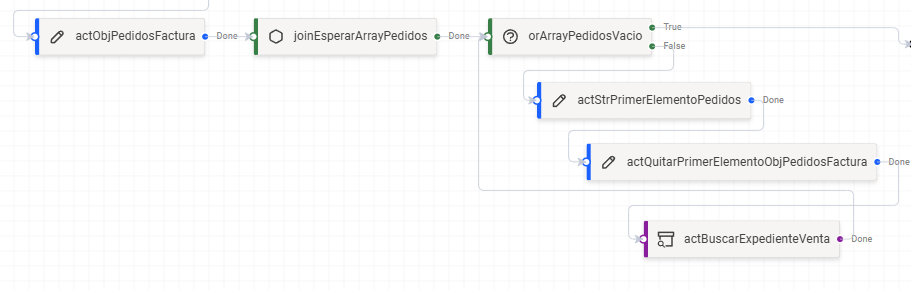
- We generate a Join activity in WaitAny mode to wait for the array each time an element is deleted and repeat the cycle as many times as necessary.
- We insert a Decision type activity that allows us to continue working with the array if it still has file values to associate with the document, or to finish if there are no more files to associate with it. To do this, we must read the object type variable generated in the first point of the cycle and see if it contains elements. In the example, objArray.
var arr = getVariable('objArray')
arr.length == 0-
- We assign the value of the first element of the object variable in the first point in String format. In the example, the object type variable is objArray.
var arr = getVariable('objArray')
arr.length == 0-
- We remove the value of the first element of the object variable from the first point in String format. In the example, the object type variable is objArray.
getVariable('objArray').slice(1)-
- We search for the file whose property value matches the first element of the array we have separated and save it in a Guid type variable that we must have created previously. In the example, we search for the file whose n property value matches the value of the strPrimerElement variable. The code below must be inserted into the value of the n property that we want to match. Remember to check the Assign documents to files box so that the document is associated with the file found.
getVariable('strFirstElement')-
- The final result of the flow set would be something like this:
No comments to display
No comments to display